AI Chatbot to Enhance the Digital Library Experience
A case study on designing an intelligent, integrable chatbot to help users discover books and navigate library apps with ease.
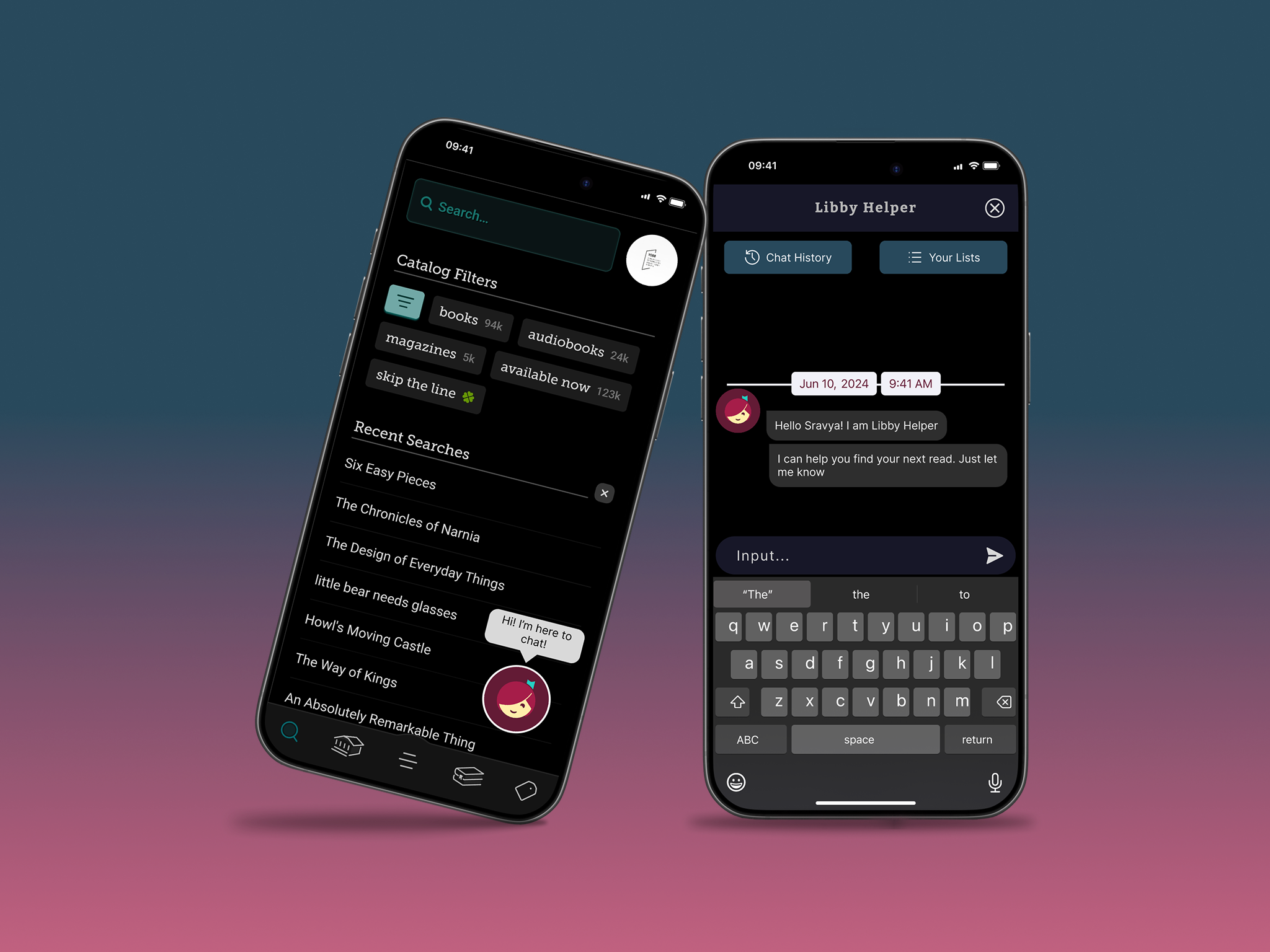
An AI Chatbot to Enhance the Digital Library Experience
Finding your perfect next book made as easy as talking to a friend!
The Problem: What’s my next perfect read?
Digital library apps like Libby have revolutionized how we access books, but they present a classic paradox of choice. Readers who are looking for a new book to read are getting broader recommendations which are not tailored to their preferences. Because of this, readers need to spend more time using other services to get recommendations and come back to the app to search for them. It makes the user experience more cluttered and time-consuming.
So the question we need to answer is:
“How might we use conversational AI to suggest personalized recommendations for readers so that they can find their next book efficiently?”.
Discovery & Research: Narrow down user pain points and possible solutions
To understand the problem space, I began with a multi-faceted research approach to uncover user behaviors, needs, and frustrations with current library apps.
Competitive Analysis
I analyzed direct competitors like Amazon Kindle, Libby, and cloudLibrary to understand their strengths and weaknesses in search, discovery, and possible integration and uses for a chatbot.
Key Finding:
- Libby: With a registered library card, the catalogue of the library is at the user’s fingertips.
- Amazon Kindle: Amazon has already established itself as a reliable bookseller before introducing eBooks and Kindle. The brand image allowed them to garner a huge reader base.
- cloudLibrary: cloudLibrary provides a way for local libraries to increase their collection of digital content by sharing resources with other cloudLink libraries in state.
There are multiple options for readers all over the world to choose from when it comes to ebooks and how they can be accessed. Libby, with its appeal of partnership with local libraries and easy-to-use interface, is a top contender. I will use it as an example to show the AI chatbot integration in this project.
Defining the User
I synthesized my findings during market user research into a user persona, “Sarah,” who represents the target audience.
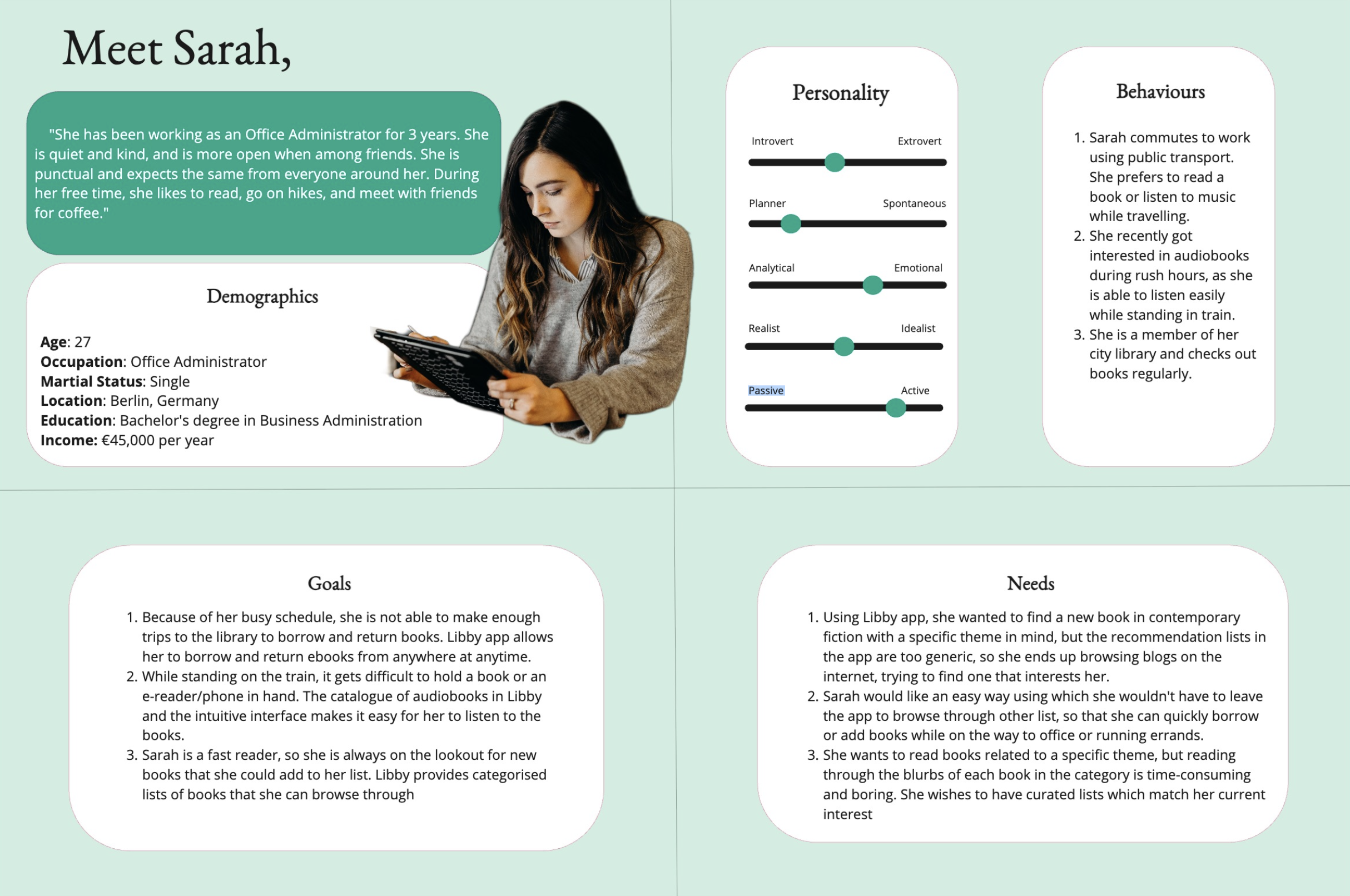
I also wanted to create User Stories which would help create the flow of the tasks users would find the most useful.
- “As a busy office worker, I want to quickly find my next read while commuting, so that I will have my desired book ready to read by the time I am home.”
- “As a picky reader, I want to have a curated list of books of a particular theme, so that I don’t have to spend time browsing articles and lists online.”
- “As a visually impaired reader, I want to use an AI chatbot to help me easily find audiobooks, so that I can borrow and listen to books without external help.”
Defining the Path: Ideation
With a clear understanding of Sarah’s needs, and keeping the user stories in mind, I focused on designing the core interaction for the chatbot. The goal was to create a natural flow that would guide users to a book they’re excited to read.
A User Journey map would help with that. It lets us visualize the steps Sarah would take to accomplish a task. In a real-world scenario, with other stake holders actively involved in the project, this could be done during a workshop. Empathy mapping can be used to articulate what we know about a particular type of user, to understand them, and to help stakeholders understand them.
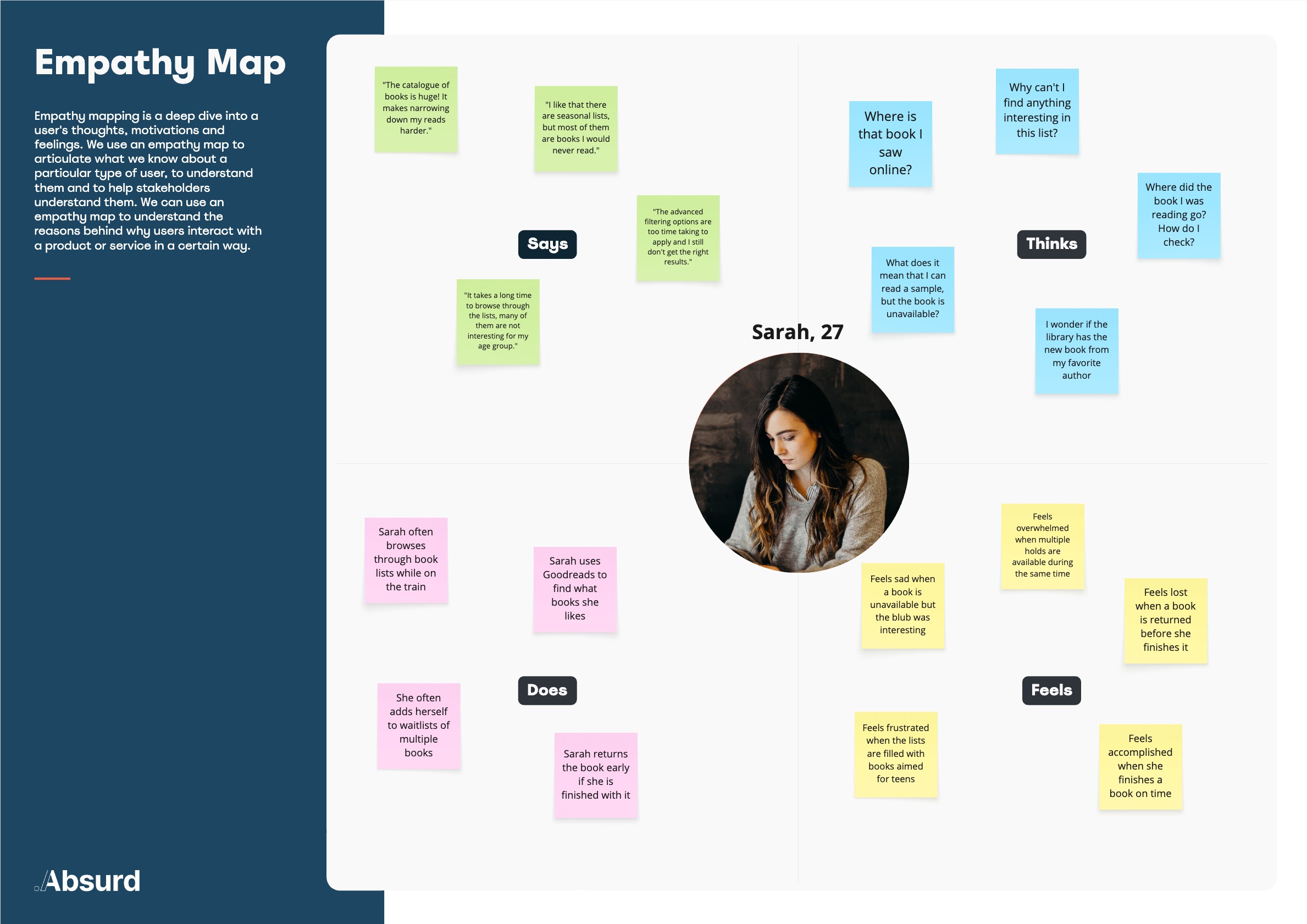
Using the findings from here, we can extrapolate how Sarah would potentially act. She is looking for an easy and fast way to find books on themes she is currently interested in, without having to leave the app or spend time scrolling through endless lists.
The User Journey Map below will show the steps she would take.
Goals for this Journey Map:
- Explore the pain points user faces while searching for a new book to read.
- Discover areas where an AI chatbot could assist the user effectively.
 *click to enlarge*
Key Findings from User Journey Mapping:
- AI Chatbot can be used for personalised lists.
Why?: Helps users not get frustrated with generic lists and find a good match faster.
- Can be used to predict reading patterns.
Why?: Helps users decide whether they should join the waitlist or just save. It also helps the book be available for other users who can read sooner.
- Can give a personalized reading schedule.
Why?: According to the book user is reading, the chatbot can give suggestions on when to read so user can finish the book on time. User can also enter their free times, and AI can make a personalized schedule for it.
- Remind that book is due, and possible solutions
Why?: Instead of a simple reminder that just warns of impending return, AI chatbot can be solution oriented and suggest what to do: return early, read for 5 mins everyday etc.
Designing the Solution: Low-Fidelity Prototypes
Now, it was time to put pen on paper. Literally.
The quickest way to go through different flow ideas is through sketching. It was the most fun part of the process, and resulted in wireframes that mapped our user needs perfectly.
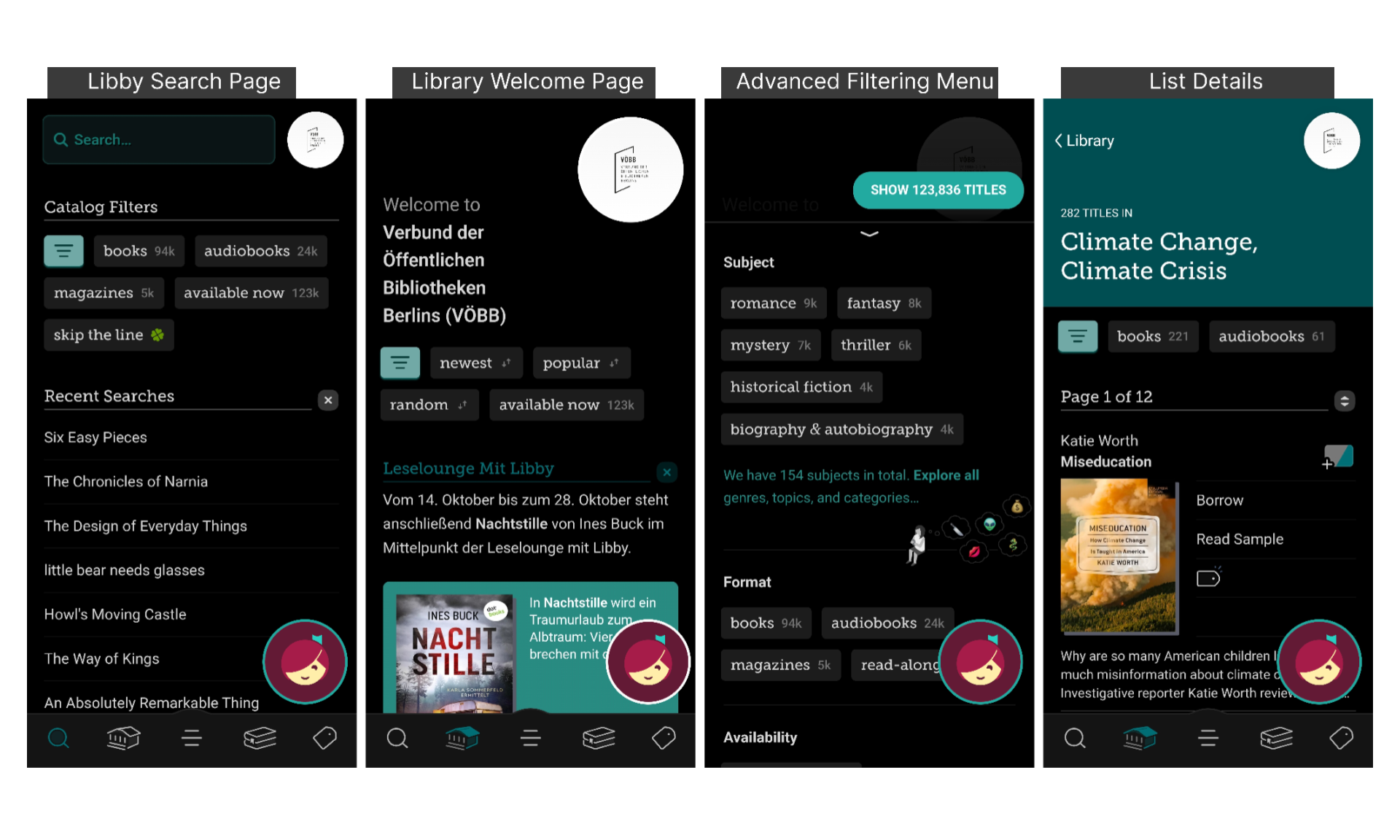
Chatbot Icon Placement
Taking Libby as example, the chatbot could be a floating icon on the right-bottom corner. It would then be easy to access and unobstrusive
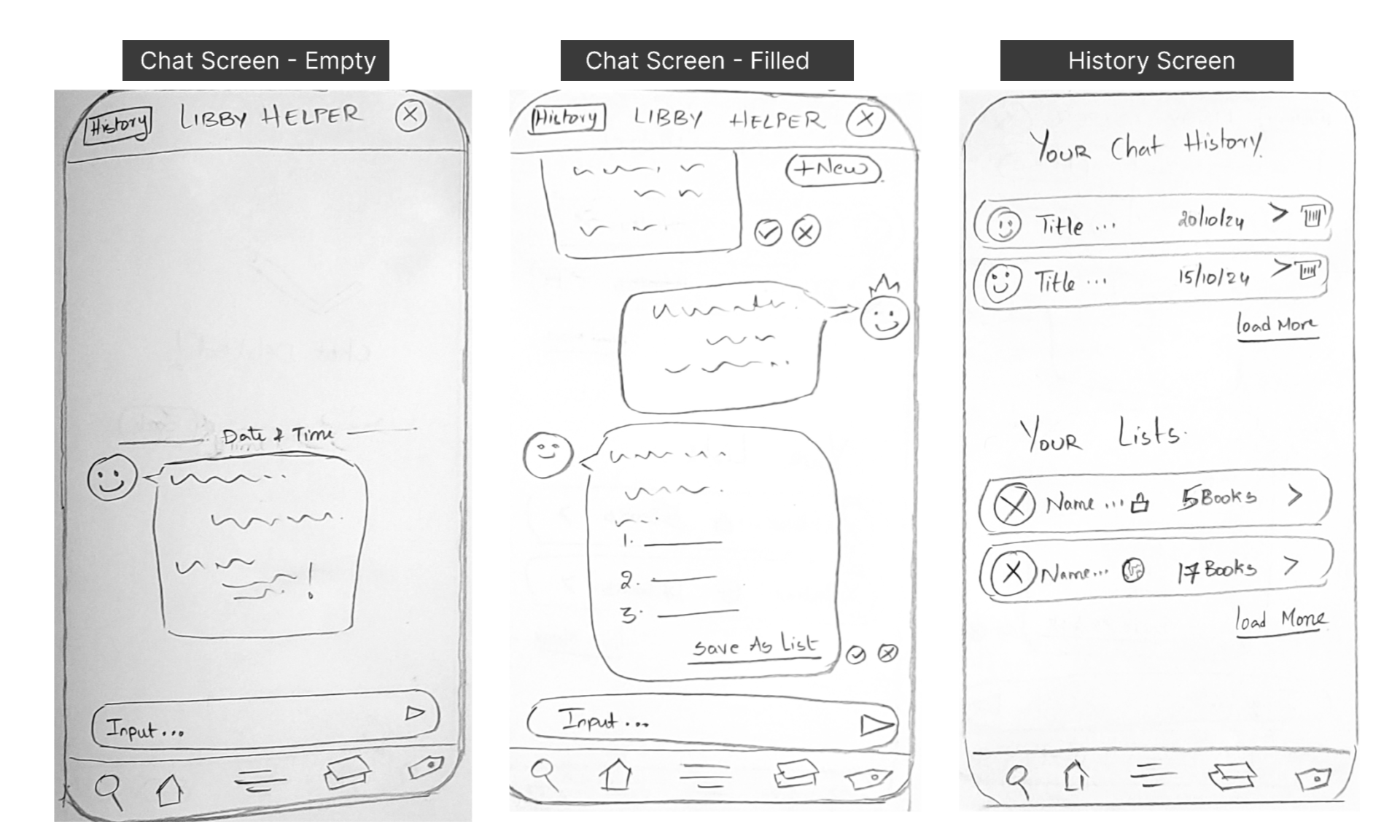
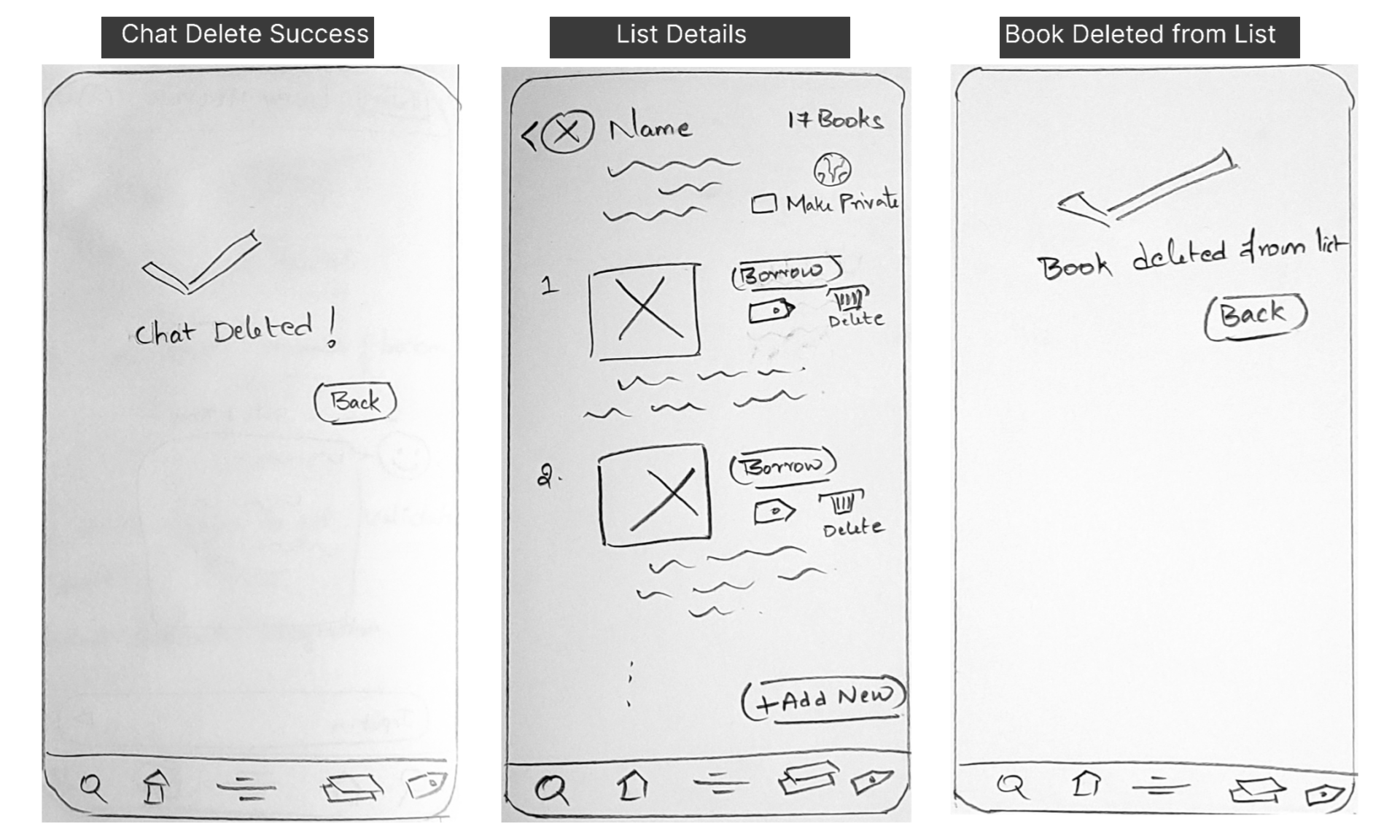
Low-Fidelity Wireframes
I started with pen and paper to quickly sketch out the main screens and conversational components. This allowed me to focus on the structure and flow without getting distracted by visual details.
Usability Testing & Iteration
To evaluate the AI chatbot concept, I conducted remote, moderated usability tests with 3 participants who matched my user persona. The plan was as follows:
Scope:
Assess how users currently discover books and whether an AI chatbot could provide faster, more personalized recommendations.
Method:
Sessions conducted online and in-person (15 minutes each).
Tasks:
- Finding available science fiction books in Libby.
- Using the chatbot to request and save a personalized book list.
- Scenario Task: You just finished the Mystery novel you were reading. You now want to read something very similar to that book but with a fantasy touch. You previously used AI chatbot to get a list of Mystery books. Use the AI chatbot to find and adjust your previous list.
Usability Test Report:
"I love the idea of a chatbot! I am very used to this functionality in many other apps like banking apps, food apps. So I'll use it a lot."
"Hmm, I don't think the icon to open chat is very clear"
Key Findings:
- 100% of participants successfully generated book lists with the chatbot.
- However, 2 out of 3 participants hesitated when identifying the chat entry point, signaling a need for clearer affordances.
Based on the observations gathered from participants actions, body language, and conversations, the following recommendations were inferred.

Refined Wireframes:
Usability tests were helpful in realising where the user has to think before performing an action, which pointed to missing intuition with the design. Design is all about iteration.
- Added a friendly “Hi!” label to the chat icon, reducing ambiguity.
- Defaulted the chatbot to open in the “filled state,” giving users full visibility of available options.
- Usability testing revealed that 3/3 participants struggled with finding the history and lists. ‘History’ button, previously hidden and ambiguous, has been divided into two and clearly labelled.
After this redesign, 100% of participants could complete the task successfully.
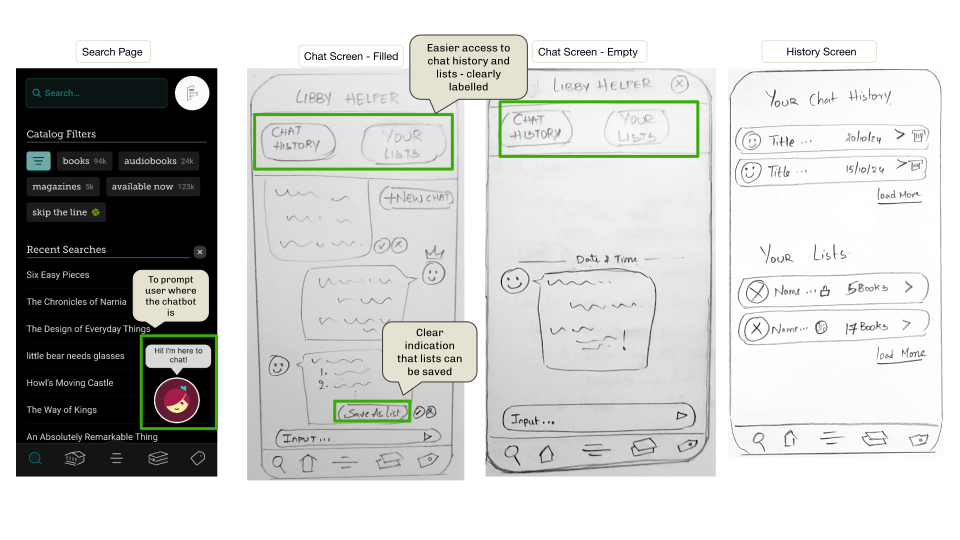
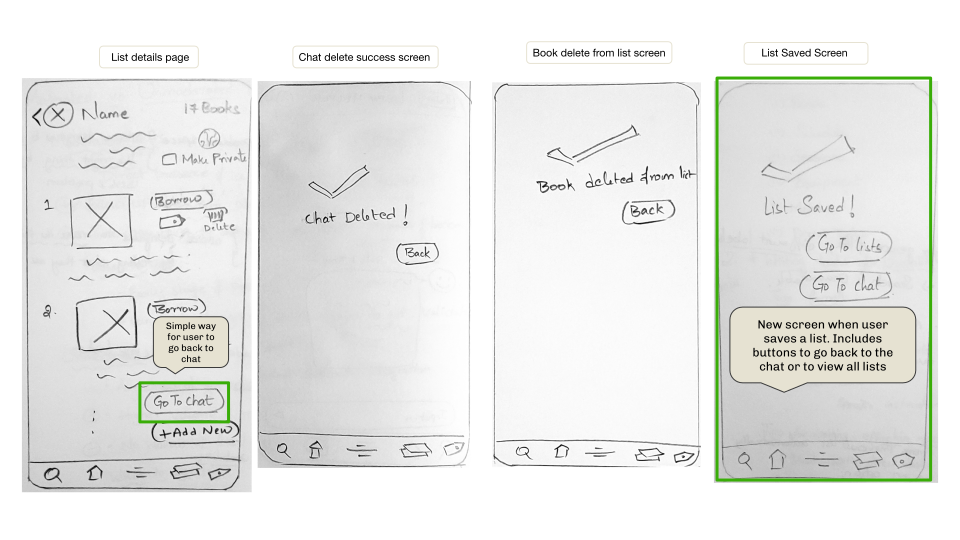
4. Saving lists is a major functionality. So the button in save the list is more clear now, with a success confirmation screen.
- Users might just want to add new books via chat instead of search. So, enabled users to return to the originating chat from the list details view for smoother adjustments.
High-Fidelity Mockup
To visualize how the final design would look like, I created a chat mockup.

Reflections & Next Steps
Not all the issues found in Usability tests could be resolved. Some of them would be taken into account during the next iteration phase or, if it is a feature addition, into next release cycle:
- When in the list details view, give an option to view the particular chat in which the list was created in. Could also show suggestions that you can modify the list this way.
- AI button for adding new books in a created list.
- Categorizing saved lists, community lists etc.
Next Steps:
- If I were to continue this project, my next step would be to design the Onboarding experience to introduce the chatbot to first-time users.
- I would also explore more advanced personalization features, such as allowing users to fine-tune their recommendation preferences.
- I will also create base design system which can then be used as a blueprint for a individualized design system to match each client, so that the AI Chatbot integration is seamless.
- A full High-fidelity prototype to test will current users of the clients, to find indepth findings and deliver a development ready design would be the final step (for the MVP)
Lessons Learned:
As the process went on, the idea and problem became clearer and more tangible. It also helped narrow down the problems I would like to tackle and be specific about the scope of the project.
What went well:
- I did not expect to find so many obvious improvements that could be made during the first usability testing, which gave me an early opportunity to improve
- The project took me through a sequential process, which helped me understand the Design Thinking Process in a practical sense.
What could be better:
- In future projects, I plan to strengthen participant recruitment strategies to ensure diverse perspectives and insights.
I hope you enjoyed! This was one of the very first projects. I learned a lot from it and created much complex and well-formed projects in the form of StepVerse and Curio. I hope you explore them too!